PTE Highlight Incorrect Words: Questions with Answers
PTE Listening
In PTE Listening, one task punishes a nervous mouse more than a weak ear. Highlight Incorrect Words shows a transcript on screen, plays a recording of 15-50 seconds once, and asks you to click every word the speaker says differently. A correct click earns a point and a wrong one takes a point away, so this is one of the PTE question types with negative marking.
Pearson's two Score Guides fix the item counts and a 0 minimum score per item, so a run of wrong clicks can wipe out an item but never cost you more.
Table of Contents
What Is Highlight Incorrect Words in PTE Listening?
Highlight Incorrect Words is a PTE Listening item in which the transcript on screen differs from the recording in some words, and you click every word that differs. In Academic/UKVI it plays a short academic talk of 15-50 seconds once. In PTE Academic it's task 7 of the 8 question types in Part 3 Listening, and in PTE Core Listening it's task 6 of 7. It scores listening and reading together, and each clicked word turns yellow, and a second click deselects it.
What Are the Highlight Incorrect Words Format and Timing Rules?
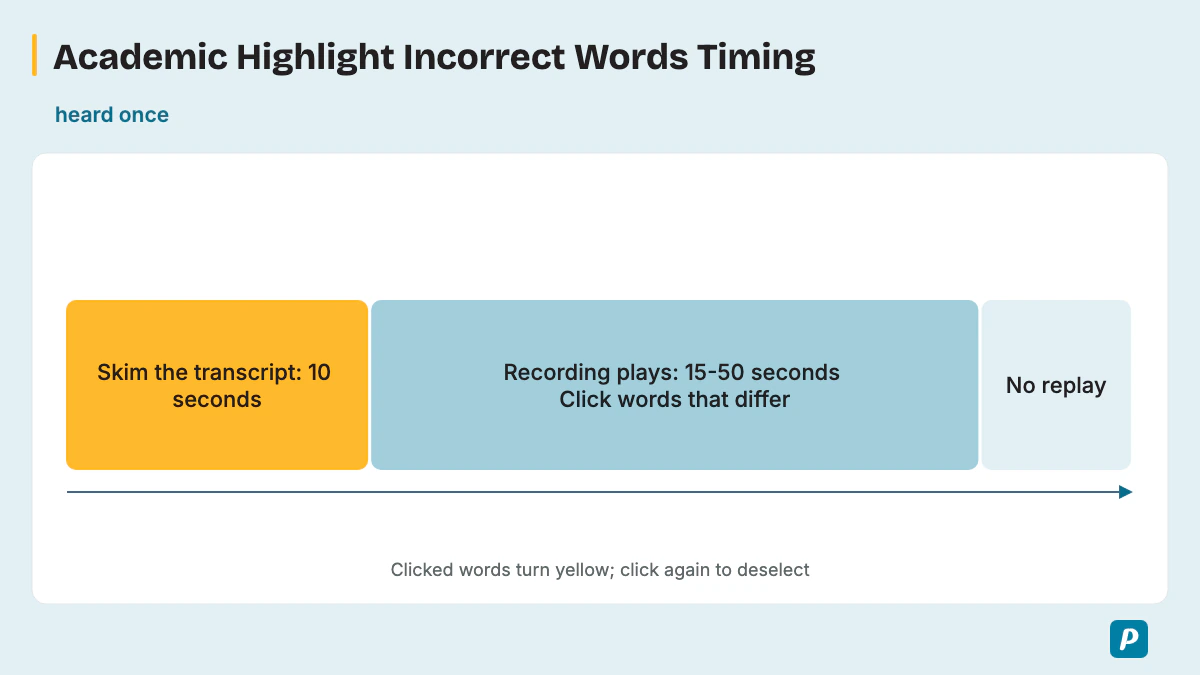
You get 10 seconds to skim the transcript before the recording starts, then the recording runs 15-50 seconds and is heard once while you click. The four stages of one item, as Pearson describes them for PTE Academic, sit in this table.
| Stage | What happens | Time or rule |
|---|---|---|
| Transcript appears | You read the text before any audio plays. | 10 seconds of skim time. |
| Recording plays | The speaker reads a version of the text. | 15-50 seconds, heard once. |
| Clicking | You click words that differ from the audio. | A clicked word gets a yellow highlight; click again to deselect. |
| Moving on | The item ends when you go to the next one. | There's no replay. |
Pearson's Score Guides set the item count at 2-3 Highlight Incorrect Words items in PTE Academic and 1-2 in PTE Core. Pearson publishes no fixed number of changed words per transcript, so never click just to reach a quota. Pearson's PTE Core Listening page has no usable timing for this task, because its block repeats the Select Missing Word text, so the timings above are the PTE Academic ones.
How Is Highlight Incorrect Words Scored?
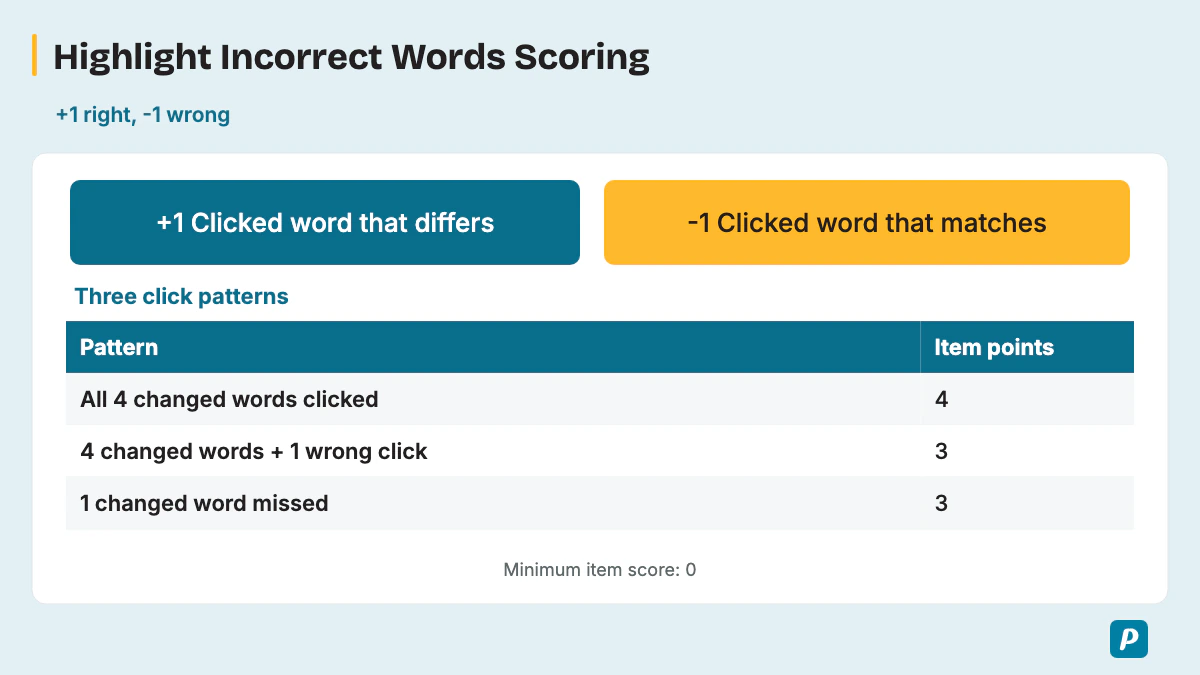
Pearson gives +1 per correct word you click and -1 per wrong word you click, so Highlight Incorrect Words carries negative marking with partial credit. Each kind of click and its effect on the item score appears in this table.
| Your click | Effect on the item score |
|---|---|
| You click a word that differs | +1 point. |
| You click a word that matches the recording | -1 point. |
| You miss a word that differs | No point. |
| You click nothing | No point. |
Here's the arithmetic for the sample in the next section, which has four changed words.
- All four changed words clicked and nothing else: 4 correct, 0 wrong, so the item earns 4.
- The same four plus one wrong click: 4 correct minus 1 wrong, so the item earns 3.
- One changed word missed and no wrong clicks: 3 correct, so the item earns 3.
One doubtful click costs exactly as much as one missed word. Both Score Guides set a 0 minimum score per item, so wrong clicks can wipe out an item's points but can't push it below zero. Pearson calls this the third of three question types where you can lose points and tells you to be confident in your choices. The item feeds both your Listening score and your Reading score.
What Does a Highlight Incorrect Words Sample Question Look Like?
Arranging a reading room
Listen while reading. Select each displayed word that differs from the recording.
Recording voice: UK English.
Original practice recording.
Transcript
Our reading group has booked the larger room for next week. We will place the chairs in a circle and leave a narrow space beside the door. Each participant should bring three pages of writing to discuss. The organiser will collect comments at the end of the session and send a brief note to anyone who could not attend.
Answer and explanation
- Word 7: The screen says “smaller”; the recording says “larger”. Select the displayed token, not its replacement.
- Word 23: The screen says “wide”; the recording says “narrow”. Select the displayed token, not its replacement.
- Word 32: The screen says “two”; the recording says “three”. Select the displayed token, not its replacement.
- Word 45: The screen says “beginning”; the recording says “end”. Select the displayed token, not its replacement.
Only the four listed tokens differ. Highlight the words on screen; do not type the spoken replacements.
Original learning exercise; practice only, not an official Pearson test item or score.
What Are Some Highlight Incorrect Words Practice Questions With Answers?
These three practice questions test the same skill: each pairs an on-screen transcript with the spoken version, and each answer key lists four words to click. Read the transcript, have a partner read the spoken version aloud once, and click as you listen before you check.
A noticeboard update
Listen while reading. Select each displayed word that differs from the recording.
Recording voice: US English.
Original practice recording.
Transcript
The welcome team updates the noticeboard every afternoon. Old notices are placed in a folder rather than thrown away immediately. This week, the team added a green heading above the activity list. Visitors can ask for a printed copy at the counter. The coordinator checks that all dates are current before the building opens for the next session.
Answer and explanation
- Word 8: The screen says “morning.”; the recording says “afternoon.”. Select the displayed token, not its replacement.
- Word 27: The screen says “blue”; the recording says “green”. Select the displayed token, not its replacement.
- Word 42: The screen says “desk.”; the recording says “counter.”. Select the displayed token, not its replacement.
- Word 50: The screen says “correct”; the recording says “current”. Select the displayed token, not its replacement.
Only the four listed tokens differ. Highlight the words on screen; do not type the spoken replacements.
Original learning exercise; practice only, not an official Pearson test item or score.
Preparing a practice event
Listen while reading. Select each displayed word that differs from the recording.
Recording voice: UK English.
Original practice recording.
Transcript
Before our practice event, volunteers will meet inside the main entrance. The organiser has prepared detailed instructions for each group. After reading them, everyone will walk through the route with a partner. Any questions should be written in the large notebook near the door. We will review those notes after the rehearsal and change the plan where necessary.
Answer and explanation
- Word 8: The screen says “outside”; the recording says “inside”. Select the displayed token, not its replacement.
- Word 16: The screen says “short”; the recording says “detailed”. Select the displayed token, not its replacement.
- Word 40: The screen says “small”; the recording says “large”. Select the displayed token, not its replacement.
- Word 50: The screen says “before”; the recording says “after”. Select the displayed token, not its replacement.
Only the four listed tokens differ. Highlight the words on screen; do not type the spoken replacements.
Original learning exercise; practice only, not an official Pearson test item or score.
Changing a room booking
Listen while reading. Select each displayed word that differs from the recording.
Recording voice: US English.
Original practice recording.
Transcript
Our group will move its next meeting to the room upstairs. The usual room is being used for a public workshop, and both events need space for discussion. Please check the revised directions before you leave home. The entrance beside the garden will remain open, and a volunteer will wait there to welcome everyone who arrives.
Answer and explanation
- Word 3: The screen says “could”; the recording says “will”. Select the displayed token, not its replacement.
- Word 20: The screen says “private”; the recording says “public”. Select the displayed token, not its replacement.
- Word 45: The screen says “closed,”; the recording says “open,”. Select the displayed token, not its replacement.
- Word 53: The screen says “guide”; the recording says “welcome”. Select the displayed token, not its replacement.
Only the four listed tokens differ. Highlight the words on screen; do not type the spoken replacements.
Original learning exercise; practice only, not an official Pearson test item or score.
How Do You Answer Highlight Incorrect Words Step by Step?
Skim the transcript in the 10 seconds you get, follow each word with the cursor as the speaker reads, click a word the moment it sounds different, and leave any doubtful word unclicked. Each step follows from the +1/-1 scoring above, which rewards accurate clicks and punishes guesses. Eight moves take you from skim time to the Next button.
- Use the skim time to find the topic and the nouns, adjectives and verbs, which is Pearson's own tip.
- Rest the cursor on the first word before the audio starts.
- Keep cursor tracking on each word as it's spoken, so your eyes and the voice stay on the same word.
- Make an immediate click on a mismatch and keep moving, without rereading the line.
- Listen for meaning as well as sound. A change can be a similar-sounding word, a different word form such as "say" for "said", or an opposite or a different number. It can also be a small word, such as an article, a preposition or a contraction like "won't" for "don't".
- Don't stall on an unfamiliar word in the transcript, and don't take notes, because Pearson advises against notes for this task.
- After the audio, deselect any click you aren't sure about, but don't add new clicks from memory.
- Click Next and move on, since the whole Listening section runs on one clock.
What Are Common Highlight Incorrect Words Mistakes to Avoid?
The costly mistakes are clicking on a guess, losing your place in the transcript and adding clicks from memory after the audio ends. Each one either adds a wrong click penalty or drops a point you could have earned. These seven are the ones to watch for.
- Accent differences: clicking a word that only sounds unusual because of the speaker's accent costs -1.
- Over-clicking: clicking a whole phrase when one word changed costs -1 for each extra word.
- Clicking to a quota: Pearson sets no fixed number of changed words, so hunting for "one more" adds a -1.
- Lost place: stopping to think about one word means you miss the next change and lose that point.
- Reading ahead: running ahead of the speaker breaks the match between word and sound, so changes slip past.
- Taking notes: writing instead of tracking pulls your eyes off the text, and Pearson advises against it here.
- Guessing from memory: adding a click after the audio ends rests on a guess, while deselecting a correct click would lose its point. Change a selection only when you have a clear reason.
How Do You Practice Highlight Incorrect Words?
Good Highlight Incorrect Words practice means short recordings with their transcripts, clicked in real time and scored with the same +1/-1 rule, so your click accuracy rises rather than your click count. A short practice loop sets the habit: it tests one clip at a time.
Play a clip once and click along, then check your clicks against the answer key. Do the self-scoring with +1 and -1, and note which kinds of change you missed: nouns, verbs, adjectives or sound-alike words.
How Do You Practice Highlight Incorrect Words Online?
Online practice works best when each clip plays once, the way it does in the test, and the tool scores every click with the same +1/-1 rule. Give yourself a timed skim of 10 seconds before each single play, and create a free account to practice with scored items. Our PTE listening tips add drills for the other tasks in the section.
Should You Guess in Highlight Incorrect Words with Negative Marking?
No, because a wrong click takes away the point a right click earns, so leave a word unclicked unless you heard a clear difference. On tasks with no negative marking, guessing always beats leaving a blank, so this task reverses that habit. Click with confidence or not at all, and read how negative marking in PTE works across the test.
How Is Highlight Incorrect Words Different from Highlight Correct Summary?
Highlight Incorrect Words tests word-level accuracy while you read along, while Highlight Correct Summary asks you to choose a summary of the whole recording. Only Highlight Incorrect Words carries negative marking of the two, so a summary choice never costs you a point. See Highlight Correct Summary for its format and scoring.
How Does Highlight Incorrect Words Fit Into PTE Listening?
It's the seventh of eight question types in PTE Academic Listening, just before Write from Dictation, and one of two Listening tasks that deduct points for wrong picks. The other is Multiple Choice, Multiple Answers, and Pearson places both inside a Listening section of 31-39 minutes in PTE Academic. Each wrong pick in either task scores -1. Our PTE Listening section guide walks through all eight tasks.
Is Highlight Incorrect Words the Same in PTE Academic and PTE Core?
Yes in scoring: the PTE Core Score Guide applies the same +1/-1 rule with a 0 minimum and credits listening and reading, but PTE Core has 1-2 items against 2-3 in PTE Academic. In Core Listening it's task 6 of 7, and because Pearson's Core page block for this task repeats Select Missing Word text, the timings come from the PTE Academic page. Our comparison of PTE Academic vs PTE Core covers how the two tests differ.
Practice PTE Listening on EasyEnglish
Try Listening tasks in a timed, computer-based format like the real test.
Try speaking practice without signing up. A free account is required for full mock tests. Practice scores are estimates, not official Pearson scores.
Written by
EasyEnglish Team
The team behind EasyEnglish's PTE practice and mock tests
We build EasyEnglish PTE practice tasks and mock tests. Official test rules are checked against Pearson guidance; exercises are authored examples, not official or predicted exam questions. Practice scores are estimates. EasyEnglish is not affiliated with or endorsed by Pearson. Contact support@inverseai.com.
Editorial review completed .